Restaurant POS, billing and inventory

Zapito restaurant POS for billing, KOT and inventory.

Run focused counter and kitchen workflows while managing recipes, purchases, stock, staff access and multiple branches through a centralized web portal.

POS + web portal
Offline-ready
Recipe control
Multi-branch

Counter application

Built for service speed

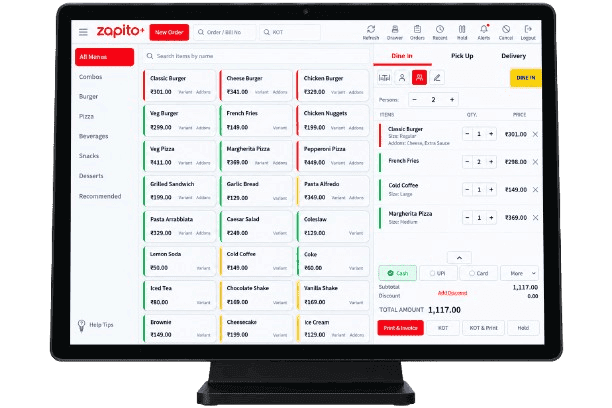
Zapito restaurant POS counter billing interface

Counter + kitchen

Billing and KOT in one flow

Manager portal

Control beyond the counter

Clear answer

What is Zapito restaurant management software?

Zapito is restaurant POS and management software that connects counter billing and KOT operations with a web portal for recipes, inventory, purchases, menus, reporting and multi-branch control.

One connected operation

Fast at the counter. Clear everywhere else.

Zapito separates the fast-paced counter experience from management work without separating the data your team depends on.

01 / Counter POS

Keep service moving

Give cashiers a focused interface for order entry, billing, table workflows, payments and kitchen tickets during busy service hours.

  • Dine-in and takeaway
  • Kitchen ticket routing
  • Table and order handling
  • Offline-ready workflows

02 / Manager portal

Manage beyond the counter

Give authorized teams browser-based control over recipes, purchases, menus, users, stock and branch reporting.

  • Recipe and stock control
  • Purchase management
  • Role-based access
  • Multi-branch reporting

Core capabilities

The daily workflows that keep a restaurant under control.

Start with the operational problem, then give each team the tools and visibility needed to solve it.

Front counter

POS billing and KOT

Handle dine-in, takeaway, parcel and delivery orders from one focused billing screen, then route KOTs to the right kitchen station.

  • Table and order handling
  • KOT printing
  • Split-payment workflows

Back office

Manager web portal

Give owners, managers and accountants the access they need to maintain menus, review activity and manage multiple outlets.

  • Role-based access
  • Menu and pricing control
  • Branch-level reporting

Stock control

Recipes and purchasing

Connect every billed item to its recipe, purchases and stock movements so food-cost information stays close to daily operations.

  • Recipe and ingredient mapping
  • GRN and supplier records
  • Stock transfers and wastage

Continuity

Offline-ready operations

Keep essential counter workflows available during connectivity interruptions and synchronize operational data when the connection returns.

  • Offline counter billing
  • Cloud synchronization
  • Centralized oversight

Inventory control

Understand stock, purchasing and food cost.

Connect recipes, purchases and stock movement so your team can investigate consumption, wastage and variance from one operational record.

01

Recipe-based ingredient deduction

Define ingredient quantities for menu items and connect each completed bill to recipe-level stock movement.

02

Purchases and supplier records

Record purchase entries, goods received, returns and supplier activity from the management portal.

03

Store-to-kitchen transfers

Track stock moving between a central store, kitchen and restaurant branches with a clear operational trail.

04

Wastage and variance review

Compare recipe consumption with physical stock to investigate wastage, over-portioning and unexplained differences.

05

Reorder and expiry visibility

Monitor minimum stock levels and perishable inventory using the batch and expiry controls configured for your operation.

Designed around service

One platform, adapted to different restaurant models.

The workflow should reflect how the restaurant takes orders, prepares food, controls stock and reviews performance.

Restaurants

Coordinate tables, counter billing and kitchen tickets through one connected workflow.

Cafés and QSRs

Keep high-volume ordering simple for teams that need speed and a clean handover to the kitchen.

Bakeries

Bring counter sales, prepared items, purchases and ingredient stock into the same operation.

Cloud kitchens

Manage delivery-focused orders, production and reporting without a traditional dining floor.

Restaurant groups

Standardize menus and reporting while retaining visibility into individual branch performance.

Evaluate the workflow

What changes when your restaurant systems work together?

A practical comparison of disconnected operations, common cloud approaches and the connected Zapito model.

Evaluation areaDisconnected workflowCloud-only workflowZapito approach
Billing and KOTOrders, kitchen tickets and payments may sit in separate manual workflows.Connected workflows, with availability depending on the product's connectivity model.Counter billing and kitchen routing are designed as one operational flow.
Manager accessReporting and configuration may be tied to the billing computer.Remote access is normally available through a browser or application.The manager portal centralizes menus, roles, purchases and branch reporting.
InventoryStock counts and recipe consumption often require separate records.Inventory depth varies by platform and subscription.Recipes, purchases, transfers, wastage and stock review share the same system.
ConnectivityLocal access may continue, while remote visibility can remain limited.Some products require a reliable connection for essential counter actions.Offline-ready counter workflows are paired with synchronization when connectivity returns.
Multiple branchesOutlet data commonly needs manual consolidation.Central reporting depends on the platform and plan selected.Menus, access and performance can be managed through a centralized portal.

Continue your evaluation with our guide to what modern restaurants need from POS software or explore Infonode's project case studies.

Implementation

A clearer path from setup to service.

A successful POS rollout is not only a software installation. It aligns the menu, hardware, stock records and people who use the system every day.

01

Understand the operation

Map counters, kitchens, order types, branches and the reports your team needs.

02

Configure menu and stock

Prepare menu items, taxes, recipes, suppliers, opening stock and user permissions.

03

Connect and train

Set up supported hardware and train cashiers, kitchen teams, managers and accountants.

04

Go live with support

Validate daily workflows, review reports and refine the setup as the team starts using Zapito.

“We partnered with Infonode’s restaurant software solutions, and it brought a world of solutions to the table that provided us efficiency that we didn’t have before.”

Rashid PatlaPuzatic Restaurant

Frequently asked

Straight answers before you choose a restaurant POS.

The exact configuration is confirmed during discovery, so the system reflects your restaurant’s devices, branches and operating model.

01How do the Zapito POS application and web portal work together?

The POS application supports day-to-day counter billing and kitchen order workflows. The web portal gives authorized owners, managers and staff a central place to manage menus, recipes, purchases, inventory, access and branch reporting.

02How does Zapito manage recipes and restaurant inventory?

Menu items can be connected to ingredient recipes or bills of materials. This brings billed quantities, purchases, stock transfers, wastage and stock review into a connected inventory workflow.

03What happens when the internet connection is interrupted?

Zapito is designed with offline-ready counter workflows. The exact offline coverage and synchronization setup are confirmed during implementation based on the devices, branches and configuration being deployed.

04Can Zapito manage more than one restaurant branch?

Yes. Zapito is designed for multi-branch operations, with centralized menu, access and reporting controls alongside branch-level operational visibility.

05What hardware is required for Zapito?

Hardware depends on the restaurant workflow. A typical setup may include a counter computer or compatible device, thermal KOT and receipt printers, and optional accessories. The supported configuration is confirmed before deployment.

06Can existing menu and stock data be moved into Zapito?

Menu, opening-stock and other setup data can be reviewed as part of onboarding. The migration method and amount of preparation required depend on the quality and format of the existing records.

07Which tax and invoicing workflows does Zapito support?

Zapito can be configured for supported GST or VAT workflows. Country-specific electronic invoicing and compliance requirements must be confirmed for the intended market before deployment.

08How can I get pricing for my restaurant?

Pricing depends on the number of counters and branches, the modules required, hardware needs, migration and implementation scope. Book a demo so the team can prepare the right configuration and quotation.

Regional implementation

Plan Zapito around the market you operate in.

Tax, invoicing, payments, support and onboarding can differ by region. Confirm the requirements that apply to your restaurant before deployment.

Discuss your region

State-wide operations

Kerala

GST-ready restaurant workflows, implementation guidance and support for teams across Kerala.

Local support

Kannur

A closer implementation path for restaurant teams working with Infonode from Kannur.

Regional configuration

Saudi Arabia

Discuss Arabic invoicing, VAT and the ZATCA requirements relevant to your deployment.

Regional configuration

Zambia

Plan currency, invoicing, connectivity and support requirements for Zambian operations.

Plan the right Zapito setup for your restaurant.

Tell us about your counters, kitchens, branches and current workflow.

Contact Us

Select Subject?